- Mon. - Fri.: 8:30 a.m. - 5:00 p.m.
Solution: Keeping Your Finances Under Control
The foundation of digital invoice processing is software that can receive, process, forward, and archive invoices in various formats (e.g., PDF, XRechnung, ZUGFeRD).
With enaio® , the entire invoicing process is made efficient and transparent:
Automated Capture: Incoming invoices are recognized and forwarded to the appropriate departments.
Centralized database: Access to orders, delivery notes, and supplier records directly within the system.
Flexible Workflows: Approvals can be single-step, multi-step, or mobile via an app.
Seamless integration: Data transfer to accounting systems such as Microsoft Dynamics 365 Business Central for direct posting.
Transparency & Security: Every step is logged and can therefore be traced at any time—including for audits.
This is howenaio® helps companies process invoices quickly, securely, and in a way that is compliant with audit requirements.
Significant time savings through digitized and automated invoicing processes.
enaio® offers GoBD-compliant archiving for maximum security.
Self-learning detection mechanisms optimize operations during runtime.
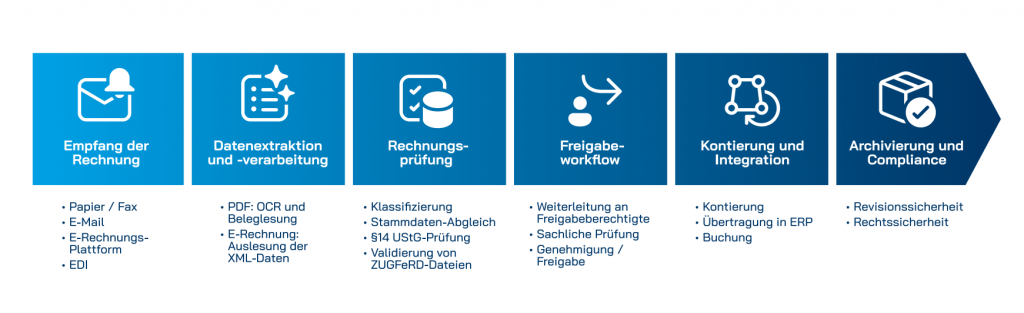
Receipt via email, EDI, or platforms such as Peppol
Incoming mail is being digitized
Support for all formats: PDF, Word, XRechnung, ZUGFeRD
Automatic data extraction using OCR technology
Minimizing Data Entry Errors
Preparing Data for Accounting and ERP Systems
Automatic reconciliation with orders and master data
Single-stage or multi-stage approvals
Mobile Sharing via App
Deadline Management for Cash Discounts and Payment Terms
Automatic account assignment with all relevant data
Transfer to ERP systems (e.g., SAP, Microsoft Dynamics)
Direct posting without manual intermediate steps
GoBD-compliant for legally compliant record retention
Centralized, immutable storage in the ECM system
Available at any time for audits and inspections
Transparent Process Overview Through Logging
Detailed analyses for better decisions
Using state-of-the-art AI and OCR technology, you can automatically capture invoices and receipts—quickly, accurately, and error-free. This saves you time, improves data quality, and ensures compliance with all regulatory requirements.
As part of the invoice processing workflow,enaio® can be seamlessly integrated with leading ERP and financial accounting software, such as Microsoft Dynamics 365 or SAP. This integration enables efficient and seamless collaboration between the various systems. Invoices, contracts, and other business-related documents can be transferred directly from the ECM to the corresponding applications to, for example, initiate purchase orders, post invoices, or make payments. Additionally, the integration helps ensure data consistency. Information is updated in real time and is available to all relevant departments.
With enaio® classify-pro-SaaS-convert, companies can quickly and securely convert their electronic invoices into the desired target format. For example, an XRechnung can be converted into a Fattura PA —ideal if you work with business partners both domestically and internationally and need to comply with different invoicing standards.
The solution complies with the requirements of the European standard EN 16931. It verifies whether the permitted UBL and UN/CEFACT CII syntaxes are applied correctly. At the same time, the system ensures that all relevant European and national business rules are followed. This guarantees legally compliant conversion of invoice data —regardless of format.
In addition to conversion, enaio® classify-pro-SaaS-convert also handles the legally compliant processing and archiving of electronic invoices. This ensures that invoice data can be securely stored in downstream systems and complies with legal requirements at all times.
Whether it's national invoice formats or internationally recognized standards —with this solution, companies are well prepared. They save time, avoid errors, and ensure that their electronic invoicing remains efficient and future-proof.